By: Rachit Kumar
As Runway Avenue scales, it’s important for us to align on established, opinionated practices for something as mission-critical as Git. These standards are a reflection of our product and development philosophies: clarity, ownership, speed, and craftsmanship. By adapting consistent Git practices across the team, we ensure optimal collaboration, faster iteration and a more robust codebase.
Our strategy follows two core pillars:
- Git Flow: A structured branching model to maintain our development, release and maintenance lifecycles.
- Conventional Commits: A commit message convention to create an explicit and machine readable commit history, improving clarity and enabling automation.
1. Git Flow
Atlassian’s Gitflow Documentation
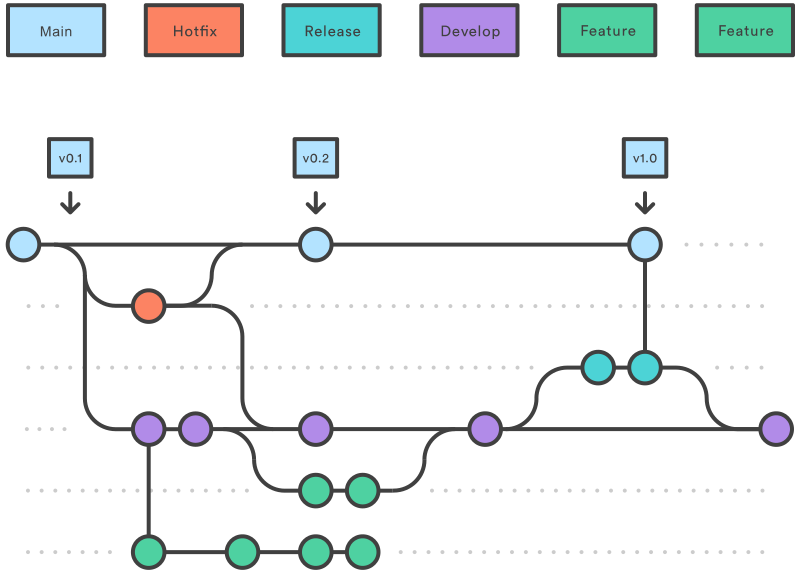
We use Git Flow to provide a robust framework to manage our code, clearly separating new features from production ready code, ensuring our main branch is always stable and ready for release.
1.1. Primary Branches
In our implementation of Git Flow, these are long lived branches that will exist for the lifetime of the project:
main- This serves as the official, production ready version of our codebase
- No commits can be made to
maindirectly ever. Code can only be merged intomainfrom eitherhotfix/*orrelease/*branches. - Every commit to
mainis a new production release and must be tagged with a version number.
develop:- This is the primary integration branch for all new features and fixes. It represents the most updated version of our development efforts.
- All
feature/*andbugfix/*branches merge intodevelop. - While
developshould be kept stable, it is not production ready. This branch should deploy into staging builds.
1.2. Supporting Branches
These are short lived branches created for a specific task. They are deleted after being merged.
Naming Convention:
Branch names should be kebab case, prefixed with their type and a forward slash.
Format: <type>/<short-description>
Example: feature/add-user-authentication
feature/*:- This branch is created to develop new features
- Branches from:
develop - Merges into:
develop
bugfix/*:- Created to solve non critical bugs discovered in
developthat are not yet in a release - Branches from:
develop - Merges into:
develop
- Created to solve non critical bugs discovered in
release/*- Opened to prepare for a new production release. This branch is for final testing, documentation updates and minor bug fixes related to the release. No new features should be added here.
- Branches from:
develop - Merges into:
main(with a version tag) ANDdevelop
hotfix/*- Opened to address critical bugs in the live
mainbranch that requires an immediate patch. - Branches from:
main - Merges into:
main(with a new patch version tag) ANDdevelop
- Opened to address critical bugs in the live
2. Commit Message Standards
Clear commit messages are absolutely crucial. Commit messages must serve as their own form of documentation and give a basic idea of what is to be expected in the commit. All commits merged into develop or main MUST adhere to the Conventional Commits specification.
Conventional Commits
2.1. Structure
<type>(<scope>): <subject>

[optional body]

[optional footers]
- Type: Describes the kind of change
- Scope: Noun describing section of the codebase affected *While scope is defined as optional in the CC standard, unless you have a very good reason not to, it’s highly encourage that you do mention the scope
- Subject: A concise description description of the change. Start with a lowercase letter and do not end with a period.
2.2. Allowed Types
| Type | Title | Description |
|---|---|---|
feat | Features | New feature for the user. Leads to minor version bump (e.g. 1.2.3 → 1.3.0) |
fix | Bug Fixes | Bug fix for the user. Leads to patch version bump (e.g. 1.2.3 → 1.2.4) |
perf | Performance | Code change that improves performance |
refactor | Code Refactor | Code change that fixes neither a bug nor adds a feature |
test | Tests | Adding/Modifying tests |
docs | Documentation | Documentation only changes |
style | Styles | Changes that do not affect code output (white space, formatting, etc.) |
build | Build System | Changes that affect build system or ext. dependences (Docker, npm, etc) |
ci | CI/CD | Changes to our CI config files and scripts |
chore | Chores | Other changes that don’t modify src or test files (updating .gitignore, etc) |
2.3. Breaking Changes
Changes that are not backward compatible/break current functionality across other parts of the codebase must be clearly MUST be clearly marked. Add a footer starting with BREAKING CHANGE: followed by a description of the change. This leads to a MAJOR version bump (1.2.3 → 2.0.0)
2.4. Examples
# Good: A simple feature commit
feat(api): add endpoint for user profiles

# Good: A fix with a scope and a body explaining more context
fix(auth): resolve token expiration issue on renewal

The token renewal logic was not correctly invalidating the old refresh
token, leading to potential reuse. This change ensures old tokens
are blacklisted immediately upon renewal.

# Good: A commit indicating a breaking change
feat(db): switch user ID from INT to UUID

BREAKING CHANGE: The primary key for the 'users' table has been changed
from an auto-incrementing integer to a UUID. All services that reference
users by their ID will need to be updated to handle the new format.
3. The End Workflow
Finally, this is how a regular workflow should look like keeping in mind all the specifications we’ve mentioned in this document.
- Start a task:
- Pull the latest dev changes from the
developbranch:git checkout develop && git pull - Create your branch following the correct naming convention:
git checkout -b feat/monitoring
- Pull the latest dev changes from the
- Develop and Commit:
- Make atomic commits. Each commit should represent a single logical change.
- Write every commit message following the Conventional Commits standard.
- Prepare for review:
- Before opening a new PR, ensure your branch is up to date with
developby rebasing:git pull --rebase origin develop. Resolve any conflicts locally. - Push your feature branch to the remote repository:
git push origin feat/monitoring.
- Before opening a new PR, ensure your branch is up to date with
- Create a PR:
- Open a PR from your branch into the
developbranch. - The PR title MUST be a well formed Conventional Commit message. This message will become the final commit on
developupon merging. - The PR description should explain the “what” and “why” of your changes.
- Request reviews from the Director working directly with you. If the PR has been opened by any of the Directors, it should be signed off by at least one other Director.
- Open a PR from your branch into the
- Merge the PR:
- Once the PR is approved and all concerned CI checks have passed, it can be merged by the Director responsible for reviewing the PR.
- We use the Squash and Merge strategy. This condenses all commits from the feature branch into a single, clean commit on
develop. - The person merging the PR is responsible for the quality and durability of the code, and to also ensure the final squashed commit message is perfect, using the PR title as a base.